In partnership with |  |
| | Welcome back to Art Piece 👋
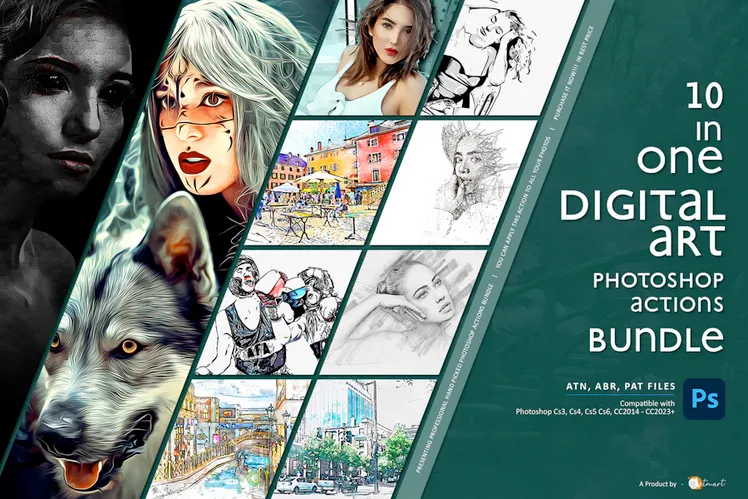
Another week, another tip, and another free tool you can use to improve and inspire your digital creations. | This time around we share a fast, straightforward, and simple way to transform any photo into a digital masterpiece. | Let’s dive in 🙌 | | | | | Today’s Free Tool: | | | It doesn’t matter if you’re a professional photographer, a graphic designer, or a creative enthusiast, you can use the 10-in-1 Digital Art Photoshop Actions Bundle to transform any photo into a digital work of art. | This tool provides access to 10 unique Photoshop actions: | Aartoon - Vectorizer Photoshop Action Aquarino - Watercolor Photoshop Action Black Viper Photoshop Action Cartoonic Oil Paint - Photoshop Action Scribble Pen Sketch - PS Action Sketchy - Pencil Sketch Photoshop Action Spray Art - Photoshop Action UrbaneXign - Mixed Watercolor Sketch Vecto Maker - Photoshop Action Vecto Maker - Photoshop Action (Vol 2)
| But that’s not all you get… | This bundle also offers 100% non-destructive actions, ensuring your original image remains intact. Furthermore, it’s incredibly easy to use; simply brush over your subject and click the play button.
Compatible with Photoshop CS3 and above, it comes with well-documented instructions to guide you through the process. And don’t forget about the commercial license that allows you to use your artwork for professional purposes. | Are you ready to get started? | |
| |
| | |
| | | | | Today’s Tip:
Transform Photos into Digital Art | Insight from Adobe | If the 10-in-1 Digital Art Photoshop Actions Bundle excites you, it’s time to learn more. And that means a tutorial on using Photoshop to transform photos into digital artwork. | Here’s what you need to do: | Import your photo: Open Photoshop and import your high-resolution, sharp-contrast portrait photo to ensure the best results. Blurriness should be avoided for optimal clarity in your digital artwork. Don’t have a subscription to Photoshop? Try it for free by clicking here.
Select your subject: Use the Object Selection tool to highlight the area you want to transform into digital art. Copy and paste this selection to a new layer and then desaturate it by navigating to Image > Adjustments > Desaturate.
Duplicate and invert the layer: Duplicate the desaturated layer and invert it by going to Image > Adjustments > Invert. Change the blending mode to Color Dodge and convert the layer to a Smart Object to maintain editability.
Create the main drawing effect: Apply a Gaussian Blur by selecting Filter > Blur > Gaussian Blur. Adjust the Radius slider until you achieve the desired effect, ranging from a charcoal look to a fine-lined pencil sketch.
Add color and texture: Create a new layer and set it to Soft Light. Use a brush with varying opacity to add color to your drawing. Enhance the artistic feel by using various Photoshop brushes to apply textures.
Make final adjustments: Add a Levels adjustment layer and change the blending mode to Multiply for a more refined sketch. Adjust the opacity and blending modes of different layers to perfect your digital artwork.
| When you combine these steps with the tool above there’s no limit to what you can do. |
| |
| | |
| | | | | That’s all for this week! | Tune in again next Monday for another set of free tips and tools. |
| |
| | |
| What did you think of today's free tool?Let us know what kinds of tools and content you'd like to see in future newsletters! | | Photo of the Week | | Finding work shouldn’t feel like work. | | You don’t need another job board.
You need a signal in the noise. | Indy AI, a new offering by Contra, helps independents find career-defining opportunities through the networks they’ve already built. It connects to LinkedIn and X, then quietly surfaces warm, high-fit opportunities hiding in your extended network, including from people you didn’t even know were hiring. | No cold outreach. No endless scrolling. No pitching into the void. Just real opportunities, backed by real people you already know. | It’s not hustle culture. It’s human signal.
| And it’s how independents grow without burning out. | Finding work shouldn’t feel like work.
| Let Indy AI do the searching, so you can focus on the work that actually matters. | Let work find you |
|